When deploying applications on Kubernetes, securely managing secrets is essential.
In this post, I will show how to integrate the External Secrets Operator (ESO) with an AKS cluster and Azure Key Vault, with a strong emphasis on automation using Terraform.
Why Choose External Secrets Operator (ESO) over the Azure Key Vault CSI Driver?
✅Ideal for hybrid or multi-cloud environments
ESO is more flexible and cloud-agnostic. It runs on any Kubernetes cluster—AKS, EKS, GKE, or on-premises—and supports many secret backends beyond Azure Key Vault, including AWS Secrets Manager, Google Secret Manager, HashiCorp Vault and many more.
✅GitOps-friendly and declarative
ESO allows you to define secrets, access policies, and sync behavior as Kubernetes Custom Resources (CRDs). This means your entire secrets management system can be separated from application code. The CSI driver, on the other hand, requires you to define secrets in pod specs, coupling application deployment with secret configuration and breaking clean GitOps separation of concerns.
✅Automatic secret syncing without pod restarts
ESO syncs secrets from external sources into Kubernetes Secret objects, which can then be consumed as environment variables or mounted volumes—no pod restart required when secrets are rotated, which is the case for the CSI driver.
How to configure the External Secrets Operator
Install the External Secrets Operator Helm Chart
Use Terraform’s helm_release resource to install ESO from its official Helm repository:
# Install External Secrets Operator helm chart
resource "helm_release" "helmExternalSecrets" {
  name             = "external-secrets"
  namespace        = "external-secrets"
  repository       = "https://charts.external-secrets.io"
  chart            = "external-secrets"

  create_namespace = true

  set {
    name  = "installCRDs"
    value = "true"
  }
}
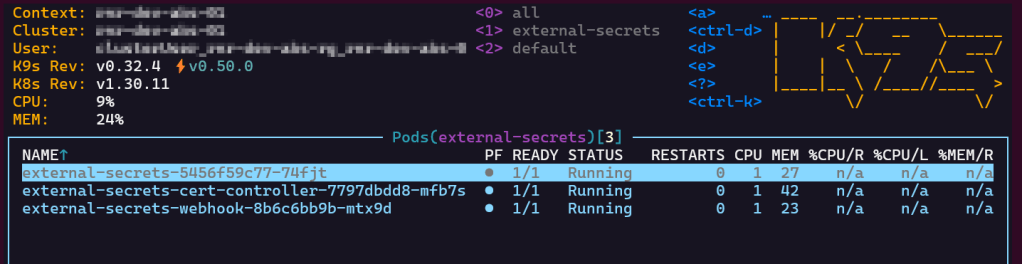
After running terraform apply, verify the deployment in K9s :
Configure Entra ID authentication via Service Principal
To allow the External Secrets Operator (ESO) to access secrets stored in Azure Key Vault, we need to configure authentication using Entra ID.
Entra ID supports both Workload Identity and Service Principal based authentication. In this blog I am using Service Principal for simplicity and compatibility across different Kubernetes environments.
Using Terraform I create the Entra ID application registration, the service principal for the app and a client secret:
data "azuread_client_config" "current" {}

# App Registration for ESO
resource "azuread_application" "aadAppEso" {
  display_name = "${azurerm_kubernetes_cluster.aks.name}-eso"
  owners       = [data.azuread_client_config.current.object_id]
}

# ESO Service Principal
resource "azuread_service_principal" "aadSpEso" {
  client_id = azuread_application.aadAppEso.client_id
  app_role_assignment_required = false
  owners       = [data.azuread_client_config.current.object_id]
}

# ESO Service Principal Client Secret
resource "azuread_service_principal_password" "aadSpPwdEso" {
  service_principal_id = azuread_service_principal.aadSpEso.id
}
Assign Key Vault Access to the Service Principal
Now that I have the Service Principal, I assign it permissions to read secrets from Azure Key Vault :
# Grant Key Vault access to the ESO Service Principal
resource "azurerm_key_vault_access_policy" "kvAccessPolEso" {
  key_vault_id = azurerm_key_vault.kv.id
  tenant_id    = data.azurerm_client_config.current.tenant_id
  object_id    = azuread_service_principal.aadSpEso.object_id

  secret_permissions = [
    "Get"
  ]
}
Create a Kubernetes secret with the Service Principal’s Client ID and Secret
To allow the External Secrets Operator to authenticate with Azure Key Vault, I now need to create a Kubernetes Secret that stores the Service Principal credentials. This secret will be used by ESO to request access tokens from Entra ID (Azure AD) when reading secrets from Key Vault.
locals {
  esoClientIdEncoded = base64encode(azuread_application.aadAppEso.client_id)
  esoClientSecretEncoded = base64encode(azuread_service_principal_password.aadSpPwdEso.value)
}

# Kubernetes secret for Service Principal authentication
resource "kubectl_manifest" "azureSecretSp" {
  yaml_body = <<YAML
apiVersion: v1
kind: Secret
metadata:
  name: azure-secret-sp
  namespace: external-secrets
type: Opaque
data:
  ClientID: ${local.esoClientIdEncoded}
  ClientSecret: ${local.esoClientSecretEncoded}
YAML
}
Create the SecretStore to Connect ESO with Azure Key Vault
I now define a ClusterSecretStore that enables the External Secrets Operator to pull secrets from Azure Key Vault using the Service Principal credentials stored in the Kubernetes Secret:
# Cluster Secret Store
resource "kubectl_manifest" "secretStore" {
  yaml_body = <<YAML
apiVersion: external-secrets.io/v1beta1
kind: ClusterSecretStore
metadata:
  name: "azure-store"
spec:
  provider:
    azurekv:
      tenantId: "${data.azurerm_client_config.current.tenant_id}"
      vaultUrl: "${azurerm_key_vault.kv.vault_uri}"
      authSecretRef:
        clientId:
          name: azure-secret-sp
          key: ClientID
        clientSecret:
          name: azure-secret-sp
          key: ClientSecret
YAML
}
Here is how it looks in K9s:

Sync a Secret from Azure Key Vault into Kubernetes
With everything configured, I define an ExternalSecret resource to pull a secret from Azure Key Vault into Kubernetes:
resource "kubectl_manifest" "storageAccessKey" {
  yaml_body = <<YAML
apiVersion: external-secrets.io/v1beta1
kind: ExternalSecret
metadata:
  name: "storage-access-key"
  namespace: external-secrets
spec:
  refreshInterval: 1h
  secretStoreRef:
    name: azure-store
    kind: ClusterSecretStore
  target:
    name: storage
    creationPolicy: Owner
  data:
    - secretKey: ACCESS_KEY
      remoteRef:
        key: storage-access-key
YAML
}
When this code is applied, the following happens:
- Terraform creates an
ExternalSecretresource namedstorage-access-keyin theexternal-secretsnamespace.

- ESO uses the
ClusterSecretStore(azure-store) to authenticate with Azure Key Vault. - ESO looks up the Azure Key Vault secret named
storage-access-key. - ESO refreshes the secret every hour (
refreshInterval: 1h), keeping it in sync with Azure Key Vault.

- A Kubernetes
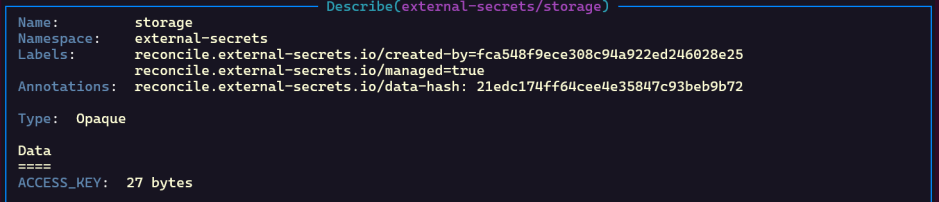
Secretnamedstorageis created in the mentioned namespace (external-secrets).

- The key inside the Kubernetes
SecretisACCESS_KEYwith the value pulled from Key Vault.
- The value is stored base64-encoded:
- Decoding it will show the secret value:

 Radu Narita